How to Turn on Enhanced Inventory Receiving (EIR) in QuickBooks

In 2019, there are lots of errors facing by QuickBooks Software, But we Every Error has its solution. In this Article We are trying to help about How to Turn on the Enhanced Inventory Receiving (EIR), What happens when you turn on EIR?, New process for receiving and paying for items.
How to Turn on Enhanced Inventory Receiving (EIR)
In QuickBooks Desktop Enterprise, Enhanced Inventory Receiving or EIR separates
Item Receipts from Bills and creates a new process for receiving and paying Items.
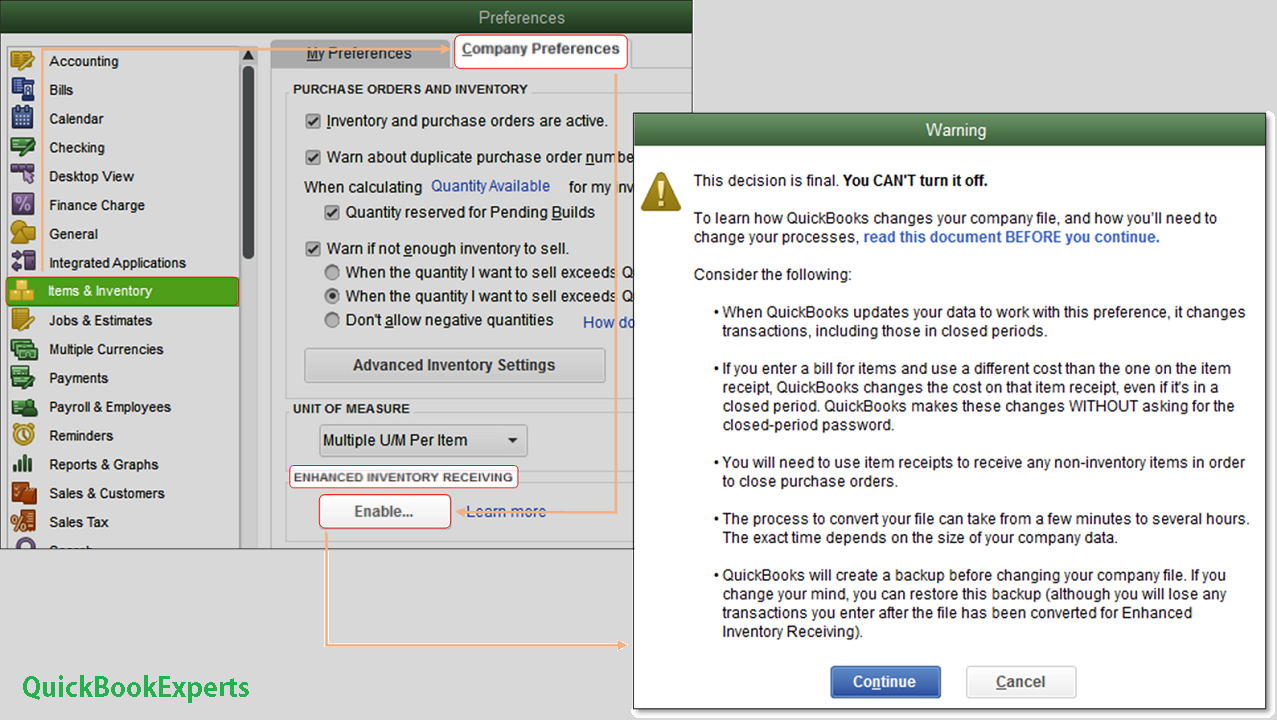
What happens when you turn on EIR?
- Bills do not increase Inventory Items and Bills created from Item Receipts no longer replace Item Receipts.
- Item Receipts no longer affect Accounts Payable unless you receive a Bill for an open Item Receipt.
- If you receive a Bill that has different costs compared with the connected Item Receipt, QuickBooks will change the item cost on the Item Receipt, even if the Item Receipt is in a closed period.
- QuickBooks Desktop recalculates inventory average cost every time a new Item Receipt is entered. These Item Receipts change the order of inventory transactions within each day and sometimes result to a small rounding error to the average cost.
- An Item Receipt is created for every Bill in your company file that included items, increasing the number of transactions.
- Third-party applications that affect inventory may not work as expected.
Restrictions when using EIR
- You cannot enter negative items in Item Receipts or Bills.
- You cannot enter expenses on an Item Receipt.
- If you create a Purchase Order for non-inventory Items, you must receive them with an Item Receipt to close the PO.
- You can no longer mark items as “Billable” on Item Receipts.
New process for receiving and paying for items
There are two ways to receive and pay inventory when EIR is off.
- Single Transaction: Enter a bill that also increases your inventory on hand.
- Two Transactions: Enter an item receipt to increase your inventory and record a bill against the item receipt.
After turning EIR on, you have to record two transactions in any order:
- An Item Receipt to increase inventory on hand.
- A Bill to pay for the Items. Take note that Item Receipts no longer affect your Accounts Payable after turning EIR on. You have to enter a Bill against an open Item Receipt to see the correct value of your Accounts Payable.
More Topics: Create Partial invoices from an Estimate in QuickBooks
Inventory valuation amounts in Point of Sale and QuickBooks Desktop do not match in 2019
